
WizMac Explorer.
A file manager for the Mac that behaves like Windows Explorer. Mac look, Windows habits.
Who it is for
Many people learn to use a computer on Windows. Then a Mac arrives — at work, at school, or at home — and every habit stops working. The window has no folder tree. Delete does not delete. Cut and paste a file is not possible. Nothing is broken, but nothing is where it should be.
WizMac Explorer keeps those habits. It sits next to Finder and does not replace it. Finder stays your default.
What it does
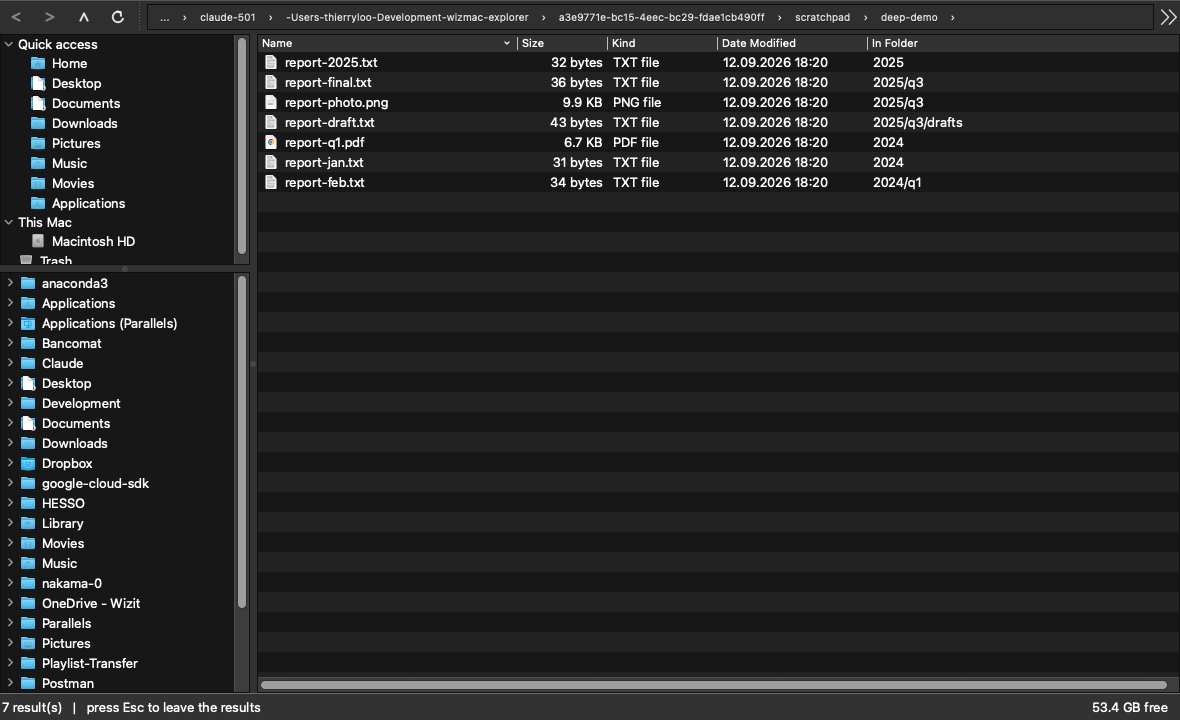
- A folder tree on the left, with your own Quick access list, your disks, your network and cloud folders, and the Trash.
- Windows keys work:
Deletefor the Trash,F2to rename,F5to refresh,Alt+Leftto go back. Mac keys work too. - Cut, copy and paste files, with a real progress bar counted in bytes, and a Replace / Keep both / Skip question.
- Undo and redo (
Cmd+Z,Cmd+Y) for copy, move, rename, new folder, zip, extract, restore and delete. Undoing a delete takes the file back out of the Trash. - Tabs and several windows, each with its own history.
- Five view modes with real previews for photos, PDF, video, Office and Keynote files. Folders always sort first.
- Search below the current folder: type, press
Return, and every result shows the folder it sits in. - Zip and unzip: Compress to .zip, andExtract here to unpack one back into a new folder next to it, with a progress bar and a Cancel button.
- Restore from the Trash. Right click an item inside the Trash and it goes back where it came from, without overwriting anything.
- Properties with real folder sizes, Terminal here, Copy as Path, and a cloud mark on files that are not downloaded yet.
The full list is in the manual.
Install it
Open the .dmg and drag the app onto the Applications folder. Then, the first time only:
- Double click the app. macOS refuses to open it.
- Open System Settings › Privacy & Security.
- Scroll down to the line about WizMac Explorer and click Open Anyway.
After that it opens normally, forever. macOS shows this warning because the app is not signed with a paid Apple developer certificate. WizIT is a non-profit association and does not hold one.
The first time the app opens your Desktop, Documents or Downloads, macOS asks for permission. That is normal, and it only asks once per folder.
Apple Silicon only. The app runs on M1 Macs and newer. It does not run on an Intel Mac.
There is no automatic update. To update, come back to this page and download the new file.
After an update, give Full Disk Access again. macOS ties a permission to the app's signature, and every new version carries a new one. In System Settings › Privacy & Security › Full Disk Access, turn the wizmac-explorer switch off and on again, then start the app again. Removing the line and adding it back is not needed. The manual has the detail.
It works offline, and it sends nothing
WizMac Explorer never connects to the internet. It has no account, no sign-in, no update check and no usage statistics. Your file names never leave your Mac.
See the privacy policy for the detail.
Licence
WizMac Explorer is free of charge for any non-commercial use, under the PolyForm Noncommercial License 1.0.0.
Non-commercial use means, among others:
- personal and family use;
- schools, universities and research;
- associations, foundations and charities, for their non-commercial work;
- public administrations and hospitals, for their public service work.
Any commercial use needs a separate licence from us. A company that wants to install it on its computers, a reseller, or anyone who wants to include it in a paid product or service, should write to info@wizit.org. We answer, and the terms are reasonable.
The full legal text is on the PolyForm Project website. It wins over this summary if the two ever disagree. See also the terms of use.
Support
WizMac Explorer is given as it is, with no guarantee and no support contract. We still read our mail: info@wizit.org.
Published by Association WizIT, La Forclaz (VS), Switzerland · Manual · Privacy · Terms of use